SQL Quarantine in Oracle 19c – Preventing Repeated SQL Performance Issues
In Oracle Database 19c, the optimizer introduces a powerful feature called SQL Quarantine. This feature prevents recurring execution of problematic SQL statements that consume excessive resources or cause performance degradation.
By automatically detecting high-resource SQL statements and placing them into quarantine, Oracle ensures that such queries cannot repeatedly impact system performance.
This feature is especially useful in production environments where runaway SQL statements can affect database stability.
Why SQL Quarantine is Needed
- Prevents problematic SQL statements from repeatedly running.
- Protects database performance and system resources.
- Works automatically based on SQL execution statistics.
- Provides better control for DBAs to review and manage quarantined SQL.
For example, if a poorly written query performs a full table scan and consumes excessive CPU or I/O, Oracle can quarantine it after the first problematic execution and stop it from being executed again.
How SQL Quarantine Works
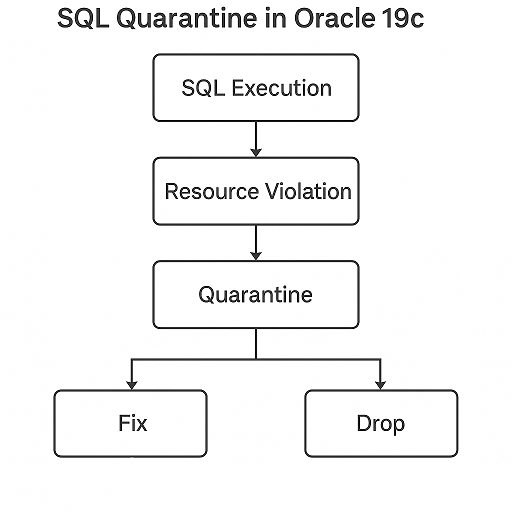
- Oracle monitors SQL statements that are executed.
- If a SQL statement exceeds resource thresholds or triggers performance violations, it is quarantined.
- Quarantined SQL cannot execute again until it is either fixed or explicitly removed from quarantine.
This is achieved by integrating SQL Quarantine with the SQL Plan Management (SPM) framework.
Enabling SQL Quarantine
SQL Quarantine is enabled by default in Oracle 19c. You can configure and manage it using the DBMS_SQLQ package.
To verify the parameter:
SHOW PARAMETER sql_quarantine
If needed, you can explicitly enable it:
ALTER SYSTEM SET sql_quarantine = TRUE;
Example: SQL Quarantine in Action
Step 1: Execute a problematic query
Assume a query on a large table causes significant performance issues:
SELECT *
FROM sales
WHERE UPPER(product_name) LIKE '%DISCOUNT%';
If this query consumes excessive resources, Oracle may automatically quarantine it.
Step 2: Check quarantined SQL
Use the following query to view quarantined SQL:
SELECT sql_id, name, status, created
FROM dba_sql_quarantines;
Step 3: Manually quarantine a SQL statement
DBAs can also manually quarantine SQL statements using:
BEGIN
  DBMS_SQLQ.CREATE_QUARANTINE(
    quarantine_name => 'Q_SALES_QUERY',
    sql_text        => 'SELECT * FROM sales WHERE UPPER(product_name) LIKE ''%DISCOUNT%'''
  );
END;
/
Step 4: Drop a SQL quarantine entry
If the query is fixed and should be allowed to run:
BEGIN
  DBMS_SQLQ.DROP_QUARANTINE(
    quarantine_name => 'Q_SALES_QUERY'
  );
END;
/
Monitoring Quarantined SQL
To monitor quarantined SQL statements:
SELECT quarantine_name, sql_id, status, created
FROM dba_sql_quarantines;
You can also see quarantine violations in the alert log or DBA_SQLQ_STATISTICS.
Best Practices
- Review quarantined SQL regularly using
DBA_SQL_QUARANTINES. - Investigate and rewrite problematic queries before removing them from quarantine.
- Combine SQL Quarantine with SQL Plan Management for better performance stability.
- Use quarantine for known “bad queries” in development before they reach production.
Advantages of SQL Quarantine
- Prevents performance degradation caused by repeated bad queries.
- Reduces DBA intervention during critical performance incidents.
- Provides automatic resource protection for the database.
- Ensures query stability in production environments.
SQL Quarantine in Oracle 19c is a powerful tool that protects database performance by automatically isolating problematic SQL statements. By leveraging SQL Quarantine, DBAs can proactively safeguard system stability and reduce firefighting during peak workloads.
Pro Tip: Regularly monitor quarantined SQL statements and integrate this feature with SQL Plan Management for a comprehensive performance tuning strategy.

Oracle DBA
Experienced OCM-certified Oracle Database Administrator with over 18 years of expertise in designing, implementing, and managing complex database solutions. My expertise spans performance optimization, security, and high-stakes solution implementation. Adept at managing complex environments with precision.
No Comments